
Blenders
Blowtorches
Breadmakers
Coffee Grinders
Coffee Makers
Deep fryers & Airfryers
Food Cookers
Food Dehydrators
Food Mixers & Food Processors
Hand Blenders
Hand Mixers
Ice Cream Makers
Ice Makers
Juicers
Kettles
Kitchen Scales
Meat Slicers
Mincers
Mini Choppers & Spiralisers
Other Kitchen Appliances
Pasta Makers
Popcorn Makers
Sandwich Toasters
Soft Drink Makers
Toasters
Vacuum Sealers
Waffle Makers











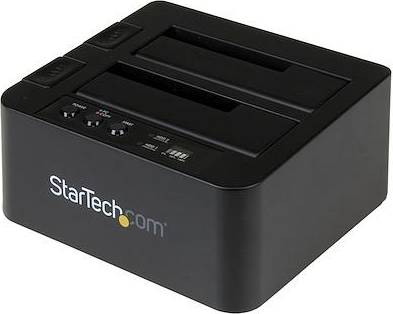


Docking Stations: 3 things to consider before buying
Before purchasing a docking station, ensure it is compatible with your device. Check the ports on your laptop or tablet and compare them with the docking station's input options. For example, if your laptop has a USB-C port, make sure the docking station supports USB-C connections. This will save you from buying additional adapters and ensure seamless connectivity.
Evaluate what peripherals you plan to connect through the docking station. Make a list of devices like monitors, keyboards, mice, and external hard drives that you'll be using. If you have multiple displays, look for a docking station that supports dual or triple monitor setups. Prioritizing your connectivity requirements helps in selecting a docking station that meets your specific needs without unnecessary extras.
If you're frequently on the move, consider the size and weight of the docking station. A compact and lightweight model is ideal for travel or hot-desking environments. Look for features like cable management to keep everything tidy in transit. On the other hand, if it's for a fixed workstation setup, larger models with more ports might be beneficial despite their bulk.
FAQ
A docking station is a device that connects a laptop or tablet to multiple peripherals. It allows you to expand your device’s connectivity with ports for monitors, keyboards, and other accessories. This makes it easier to create a desktop-like setup for enhanced productivity.
Choosing the right docking station involves considering your device's compatibility and your specific needs. Check the number and type of ports you require, such as USB-C or HDMI, and ensure the docking station supports your operating system.
Docking stations are compatible with laptops, tablets, and sometimes smartphones. Compatibility depends on the device's ports and operating system. Ensure your device has the necessary connection type like USB-C or Thunderbolt 3 for seamless integration.
Docking stations are used to enhance productivity by providing additional connectivity options. They allow you to connect multiple peripherals, reducing cable clutter and enabling a more organized workspace. This is ideal for professionals who need to switch between different devices easily.
Not all docking stations are universal. Some are designed specifically for certain brands or models. Check compatibility with your device before purchasing to ensure it meets your requirements and supports the necessary connections.
You can use a docking station with multiple monitors if it supports dual or triple display outputs. Look for features like HDMI or DisplayPort connections that accommodate additional screens, enhancing multitasking capabilities in your workspace.
Borrowing more than you can afford or paying late may negatively impact your financial status and ability to obtain credit. Credit subject to status. Ts&Cs and late fees apply.
Advertisement
Popular searches in Docking Stations
- Hp laptop docking station
- Macbook air 2025
- Ipad cover a16
- Apple ipad pro 12.9
- Ipad 9th generation case 10.2
- Ipad cases
- Ipad 9th generation
- Ipad air m2
- Ipad for kids
- Apple pencil pro
- Samsung galaxy tab cover a11
- Samsung tablet keyboard
- Cases tablet cases for ipad 9th generation
- Apple ipad 11 case
- Ipad keyboard cover
- Ipad gen 10 case
- Ipad 2025 cover
- Ipad air 2024 13
- Lenovo tab m11 cover
- Macbook air 13 inch case
Borrowing more than you can afford or paying late may negatively impact your financial status and ability to obtain credit. Credit subject to status. Ts&Cs and late fees apply.